

 [gtranslate]

Summary of IRS 2026 Changes
| Change | Description | Key Details |
|---|---|---|
| New Reporting Schedule | Introduction of Schedule 1-A attached to Form 1040 | Consolidates several newly introduced deductions |
| Tip Income Deduction | Allows deduction of qualified tip income | Up to $25,000 deduction |
| Overtime Compensation Deduction | Deduction for eligible overtime earnings | Up to $12,500 (individuals) or $25,000 (joint filers) |
| Car Loan Interest Deduction | Deduction for interest on qualified passenger vehicle loans | Up to $10,000 |
| Enhanced Senior Deduction | Additional deduction for taxpayers aged 65 and older | Applies based on eligibility and income thresholds |
| Temporary Deduction Framework | New deductions are temporary provisions | Currently scheduled to apply through 2028 |
*The information in this table is based on IRS guidance available at the time of writing. Tax laws, deductions, and reporting requirements may change as new updates are released. Readers should refer to the latest IRS announcements. This content is for informational purposes only and should not be considered tax advice.
While these deductions are designed to provide targeted tax relief, they also introduce new eligibility rules, income phase-outs, and documentation requirements. CPA firms must verify income sources, calculate deduction limits accurately, and ensure proper reporting under Schedule 1-A before returns are filed.
When applied across hundreds of client returns, these additional steps significantly increase preparation and review time during tax season. The next section explores how these regulatory updates translate into heavier workloads for CPA firms during the 2026 filing season.
How the New Rules Quietly Expand CPA Workload
Workload Issue 1: More Context Behind the Numbers
Tax preparation has always involved entering financial data into a return. The recent changes, including new IRS deductions 2026, however, require preparers to understand more context around that data. When income categories such as tips or overtime become deductible, accountants must confirm how that income was earned and whether it qualifies under the new rules.This shifts part of the preparation process from simple data entry toward verification. Payroll details, client records, and supporting documentation must be reviewed more carefully before deductions can be applied.
Workload Issue 2: Greater Analytical Effort During Preparation
Many of the new deductions come with limits, income thresholds, or eligibility conditions. As a result, preparers often need to evaluate different scenarios before deciding how a deduction should be applied. What looks like a straightforward return can require additional calculations to determine whether claiming a deduction actually benefits the taxpayer.This analytical step may only add a few minutes to a single return. Across hundreds of clients, however, the cumulative effect becomes significant, particularly for firms delivering tax preparation and review services at scale.
Workload Issue 3: A More Demanding Review Process
The review stage is where the complexity often becomes most visible. Partners and senior reviewers must ensure that deductions are applied correctly and supported by appropriate documentation. When new reporting schedules or deduction categories appear, the number of elements that must be verified naturally increases.The result is not necessarily more difficult work, but more careful work. Returns that previously moved quickly through the review process now require additional checks to confirm compliance.
Taken together, these shifts illustrate how policy updates gradually reshape the preparation process inside accounting firms. The challenge is less about understanding new rules and more about managing the additional time and attention those rules require during an already compressed filing season. Many firms therefore begin exploring CPA firm tax preparation support to maintain efficiency as compliance demands grow.
Ready to strengthen your capacity and hit every deadline?
Contact Unison Globus now to schedule a quick assessment
and build a more resilient, review-ready tax workflow.
Why Outsourcing Tax Preparation Is No Longer Optional
Every tax season raises the same operational question for CPA firms: how do we handle more work without exhausting the team or compromising quality?
The 2026 filing season intensifies this question. With new deductions, additional reporting schedules, and more verification requirements, each return now requires more attention than before. Even when the changes themselves are manageable, the cumulative effect across hundreds of clients creates a meaningful capacity challenge.
For many firms, the issue is not technical knowledge. Most teams understand the rules and can apply them correctly. The real constraint is time. When preparation, verification, and review all take longer, the firm’s existing resources begin to stretch thin.
Real Constraint Is Capacity
Tax work has always followed a sharp seasonal pattern. A large portion of the year’s workload arrives within a few months. Historically, firms addressed this by asking teams to work longer hours or by hiring temporary staff.However, as compliance complexity increases, these solutions become less effective. Longer hours can lead to burnout, while short-term hiring rarely solves the deeper problem of workflow capacity.
This is where tax preparation outsourcing for CPAs has begun to shift from convenience to a strategic necessity. By choosing to outsource tax preparation, firms can expand the amount of work their organization can process without permanently increasing internal headcount.
Outsourcing Is Not New, but the Model Has Evolved
It is important to note that outsourcing itself is not a new concept in accounting. Firms have relied on external support for years to manage bookkeeping, data entry, and seasonal workload spikes.What has changed is the structure and sophistication of outsourcing models. Today, many firms operate with integrated support teams that function as an extension of the firm’s internal staff. These teams work within defined processes, use the same software environments, and follow strict compliance protocols.
This evolution has made offshore tax preparation services far more practical for firms that require consistency, confidentiality, and predictable turnaround times.
Global Teams Are Becoming Part of the Workflow
Another development shaping the profession is the growing normalization of global teams. Instead of relying solely on local staffing, many firms now build preparation workflows that include both internal staff and specialized offshore professionals.These teams are trained specifically in U.S. tax regulations and preparation processes. When integrated effectively, they handle structured preparation tasks while internal professionals focus on advisory work, client relationships, and final review.
This approach allows firms to maintain quality while expanding their operational capacity.
Strengthening the Review Process
Preparation is only one part of the tax workflow. As deduction structures and reporting schedules expand, the review stage often becomes the most time-consuming part of the process.To address this, firms frequently incorporate outsourced tax review services to support internal teams. Additional review capacity helps ensure that deductions, calculations, and documentation are properly validated before returns move to final approval.
For firms providing comprehensive tax preparation and review services, this layered approach helps maintain compliance standards even during periods of heavy workload.
How Unison Globus Supports CPA Firms During Complex Tax Seasons
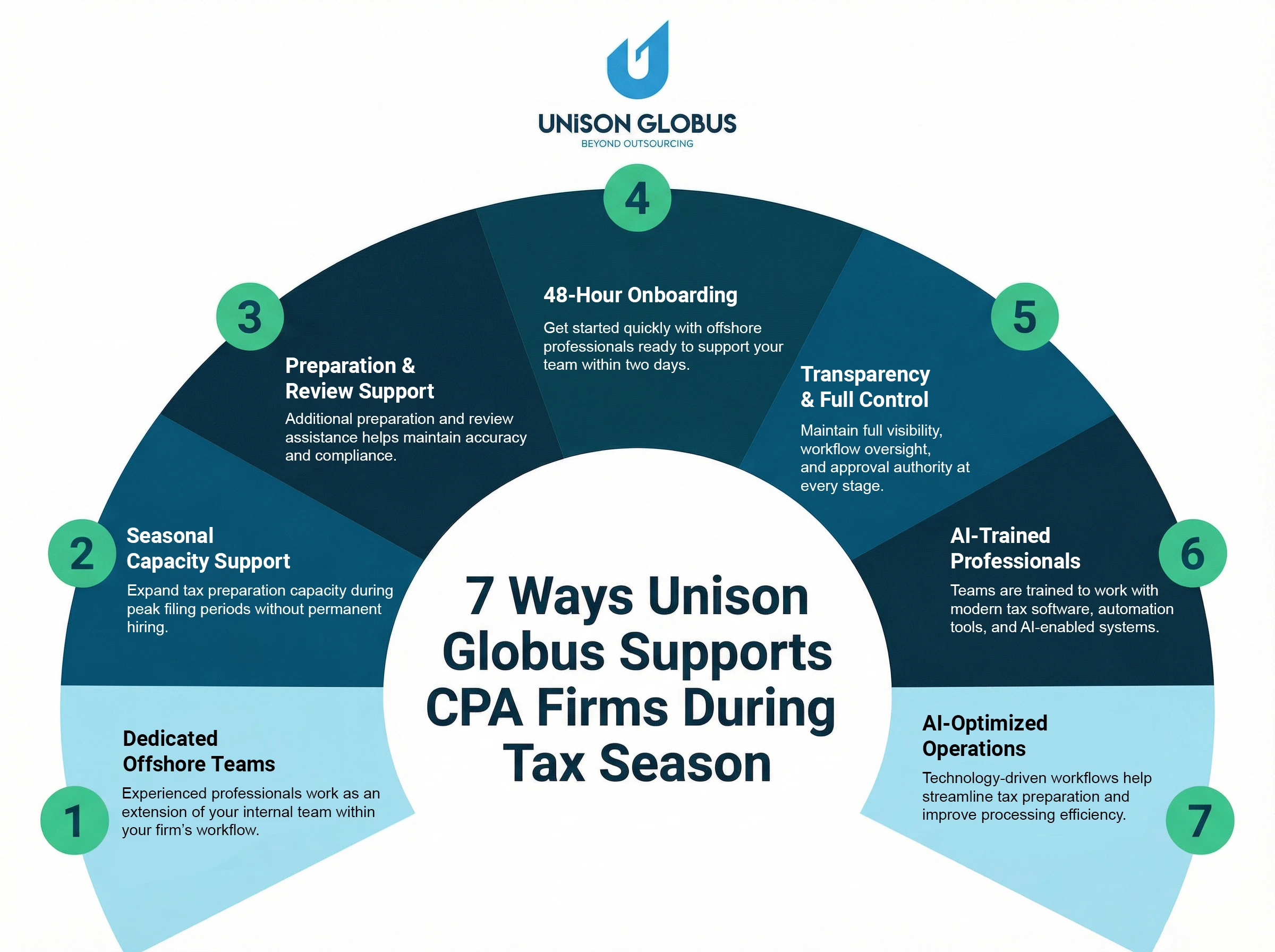
At Unison Globus, the focus is not simply on outsourcing tasks. The goal is to integrate preparation and review support into a firm’s existing workflow so that internal teams remain in control while capacity expands during peak periods.
Dedicated Offshore Team Model
Some firms prefer a long-term support structure where an offshore team works consistently with the firm throughout the year.In this model, professionals function as an extension of the internal staff. They work within the firm’s preferred software environment, follow the same workflow procedures, and handle recurring preparation tasks such as organizing financial data, preparing draft returns, and documenting deductions.
Because the same team works with the firm continuously, familiarity with the firm’s processes and client requirements improves over time.
Seasonal Capacity Model
Other firms primarily require support during the busiest months of the filing season.Under this model, additional professionals assist with offshore tax preparation services during peak periods. Once the filing season passes and workload stabilizes, the firm can scale the level of support accordingly.
This approach allows firms to expand operational capacity during peak demand without committing to permanent hiring.
Preparation and Review Support
Some CPA firms also integrate outsourced tax review services alongside preparation support. While preparation teams assist with drafting returns and organizing documentation, review specialists provide an additional layer of verification before returns move to final approval.This layered approach helps firms maintain accuracy and compliance standards while managing higher return volumes.
Designed Around Firm Workflows
The common thread across these models is flexibility. Every firm structures its tax workflow differently. Some prefer preparation-only support, while others integrate both preparation and review assistance.
The objective is not to replace the firm’s internal team but to strengthen the workflow around it. When preparation capacity expands and review bottlenecks are reduced, firms can maintain service quality even during demanding filing seasons.
For CPA firms navigating increasing regulatory complexity and seasonal workload spikes, structured outsourcing models provide a practical way to keep operations running smoothly without placing additional strain on internal teams.
Conclusion
If your firm is facing rising compliance demands or seasonal workload pressure, partner with Unison Globus to confidently scale your tax preparation and review capacity without disrupting your workflow. Our U.S.-focused experts integrate seamlessly with your processes, accelerate turnaround, and safeguard accuracy and compliance especially under the IRS 2026 changes.